How to split your SD card between adopted internal storage and portable external storage.
(see how-to instructions below)The pain
Fed up of waiting on Motorola for the Marshmallow upgrade on my XT1072, and being short of internal storage, and being very fed up of having to move-to-sd apps after upgrade (along with occasional tricks such as deleting all data for drive, google+, chrome to scavenge extra memory when clear-cache wasn't enough) I decided to upgrade to CyanogenMod 13 to get Marshmallow that way.
I was really looking forward to being able to use my SD card as internal memory and have no more problems about storage.
What really happens is that with Marshmallow you cannot move-to-sd without adopting your SD card as internal. And then the only apps that will move-to-sd (now called Change) are those that could already move-to-sd.
And one of those apps that won't move-to-sd (even after the adoption of the SD card as internal storage) is Google Music.
Only now there is no SD card for Google Music to store the music on. So it stores it on the *internal* memory.
Whaaaat! My music collection is way bigger than my app collection, how does storing my music internally instead of some apps (all of which could move to SD anyway) help anything?
After messing abuot with Links2SD, Apps2SD, root shells and mount points, reading about volume manager and changing API's I decided that even loopback file fat32 systems in the adopted storage probably wouldn't work.
So I looked at re-partitioning an adopted storage card to shrink the adopted partition to make room for a fat32 partition.
In searching how to access the encrypted partition outside of Android (so that I could resize the file system within it) I came across these notes https://nelenkov.blogspot.co.uk/2015/06/decrypting-android-m-adopted-storage.html?view=flipcard I came across the sm command which can create a mixed or public or private volume.
Mixed turned out to be exactly what I was looking for!
How to split your card
WARNING: Before you do this, be sure to eject the card from the Settings/Storage & USB menu.WARNING: Regardless of whether you split your card, or just adopt as encrypted, or even just re-format as FAT, it may not be good for the life of your card. It seems that some SD cards have long-life flash allocated to the first few blocks where the FAT is kept. Using a non-FAT file system, or having the FAT file system further down the device loses that benefit, possibly even altering the pre-shipped format could do that too. [http://events.linuxfoundation.org/sites/events/files/slides/fs-for-embedded-full_0.pdf]
I found how to partition my SD card to give 8G as internal storage to which all apps that can be moved will be moved and leave ~20GB as portable storage to hold music, etc.
First, you need adb working, and your SD card inserted and formatted as portable.
$ adb shell sm list-disks adoptable
disk:179,64
disk:179,64 is my SD card that can be made adoptable, I want 90% as external SD:
$ adb shell sm partition disk:179,64 mixed 90
Note: Your card may be listed with an underscore _ instead of a comma, e.g. disk:179_64 in which case, that is what you type.
This erases the entire SD card, and then gives me 90% as portable storage and the rest as adopted internal storage.
The partition table looks like this:
Number Start End Size File system Name Flags
1 1049kB 57.5GB 57.5GB fat32 shared msftdata
2 57.5GB 57.5GB 16.8MB android_meta
3 57.5GB 63.9GB 6369MB android_expand
The fat32 partition is not encrypted and can be mounted on a computer (provided it can handle the new GUID partition table format).
I advise a reboot after setting the new music storage location this as Google Music may get the wrong idea about much space is available.
Rename the adopted storage. If it had the same name as the portable storage partition then it may prevent one of the partitions from being available over USB MTP.
For reasons I don't understand, my disk label gets set as some junk similar to this: 82^GM-^KM-^?N-q^Xa^Oo and although I can change this by inserting it into a computer: mlabel -i /dev/sdf1 :: if I put it back into my phone, it looks right until I soft-eject and re-insert it (from the menu) - and then the weird label is back.
I wonder if this can be avoided by swipe-dismissing the notice that a new SD card is discovered (which shows after the mixed partition is complete) instead of selecting it.
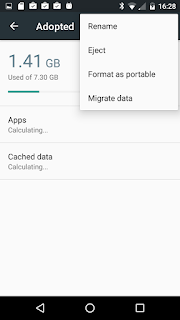
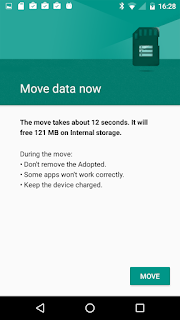
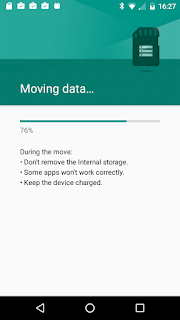
If you want apps to be installed on the adopted SD partition by default, then you need to choose the Migrate Data option from the menu:
For CM13 this seems to work as an alternative to my original suggestion below which required the phone to be rooted, but for stock it seems ineffective.
to have apps installed on the storage by default where possible. It is very effective. (Location 1 means internal, and 0 means auto-choose, but I don't know on what criteria).
However that command requires you to have rooted your phone. I wish this could be set another way.
(If you want to root your XT1072, follow the top-post instructions here: http://forum.xda-developers.com/moto-g-lte/general/root-marshmallow-stock-rom-t3317859)
This lets you use USB devices as adopted/portable (if you are rooted):
For reasons I don't understand, my disk label gets set as some junk similar to this: 82^GM-^KM-^?N-q^Xa^Oo and although I can change this by inserting it into a computer: mlabel -i /dev/sdf1 :: if I put it back into my phone, it looks right until I soft-eject and re-insert it (from the menu) - and then the weird label is back.
I wonder if this can be avoided by swipe-dismissing the notice that a new SD card is discovered (which shows after the mixed partition is complete) instead of selecting it.
If you want apps to be installed on the adopted SD partition by default, then you need to choose the Migrate Data option from the menu:

For CM13 this seems to work as an alternative to my original suggestion below which required the phone to be rooted, but for stock it seems ineffective.
# You won't need this if you chose migrate data above
$ adb root pm set-install-location 2
to have apps installed on the storage by default where possible. It is very effective. (Location 1 means internal, and 0 means auto-choose, but I don't know on what criteria).
However that command requires you to have rooted your phone. I wish this could be set another way.
(If you want to root your XT1072, follow the top-post instructions here: http://forum.xda-developers.com/moto-g-lte/general/root-marshmallow-stock-rom-t3317859)
This lets you use USB devices as adopted/portable (if you are rooted):
$ adb shell sm set-force-adoptable true

